
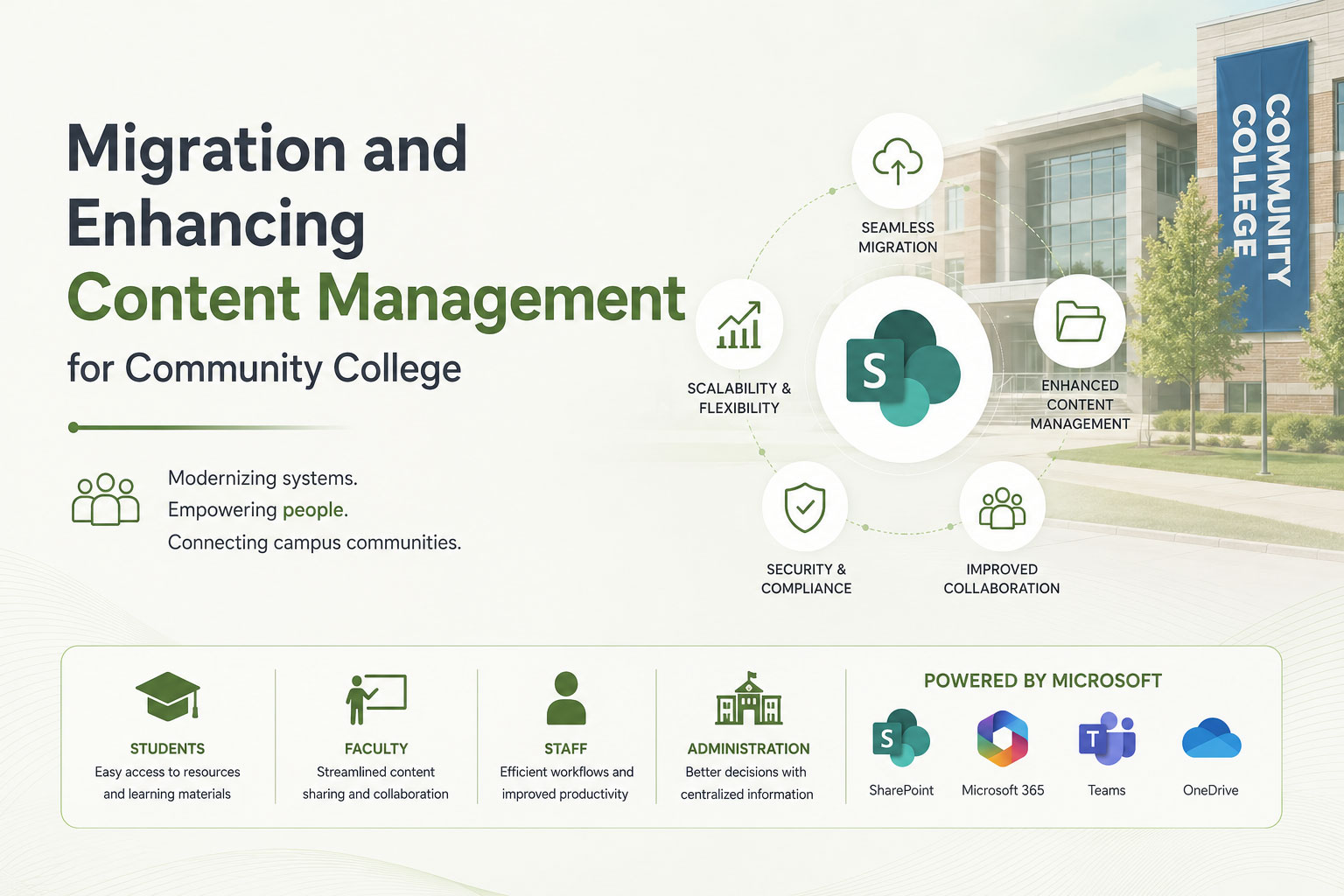
Migration and Enhancing Content Management and Collaboration for Community College
Client Overview
Community College encompasses 70,000 students. With an international student population of 7%, is one of the largest community colleges, renowned for its diverse and inclusive academic environment.
| Client: | Community College |
| Industry: | Higher Education and Community Services |
| Size: | Large institution serving 70,000 students of Excellence and an international student population of 7%. |
Project Objective
To modernize CC’s content management systems by:
- Implementing SharePoint 2013.
- Migrating from Vignette (CMS) to SharePoint 2013.
- Upgrading SharePoint 2010 to SharePoint 2013.
The goal was to enhance operational efficiency, reduce maintenance overhead, and provide students, faculty, and staff with an advanced, responsive platform for collaboration and resource management.
Project Overview
The migration and implementation process followed a structured lifecycle with three critical phases:
Phase 1: Planning and Assessment
- Comprehensive Review: Assessed existing SharePoint 2010 and Vignette (CMS) environments to identify challenges and opportunities.
- Roadmap Development: Established clear milestones and objectives to ensure seamless transition and minimal disruption.
- Stakeholder Engagement: Engaged key stakeholders to align the system’s features with user needs and institutional goals.
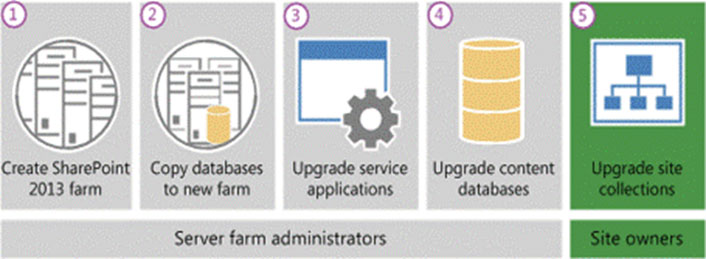
Image 1: Planning and Assessment Workflow
Phase 2: Migration and Development
SharePoint 2010 to SharePoint 2013 Migration
Database-Attach Method:
- Created a new SharePoint 2013 farm and configured farm settings.
- Copied and upgraded databases using SQL Server tools.
- Maintained read-only access to the SharePoint 2010 farm during migration to minimize downtime.
Customizations:
- Installed server-side customizations to replicate existing functionalities.
- Configured web applications to match URLs and port numbers.
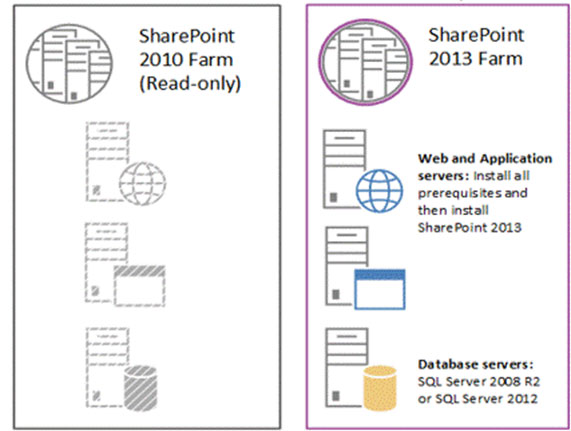
Image 2: SharePoint Migration Steps
Vignette (CMS) to SharePoint 2013 Migration
- Migration Tools: Used Metalogix Migration Manager to extract, map, and import content seamlessly into SharePoint 2013.
Content Structuring:
- Recreated site structures and integrated managed metadata.
- Ensured data integrity and usability by addressing Vignette’s XML export challenges.
User Training and Validation
- Conducted hands-on workshops for stakeholders to familiarize them with SharePoint’s enhanced features.
- Iteratively tested system configurations, addressing issues with site collection upgrades and metadata mapping.

Image3: Technical Flow Diagram: Content Migration and Integration Workflow3
Diagram illustrates the content migration workflow, starting with the export of existing systems, progressing through database attachment, configuration, and user training, and concluding with a fully operational SharePoint 2013 environment.
Phase 3: Go-Live and Continuous Improvement

Image 4: Technical Flow Diagram: Go-Live and Monitoring Workflow
Diagram represents the Go-Live and Monitoring workflow. It begins with a phased rollout plan, includes real-time feedback and iterative improvements, and loops back for continuous system optimization.
Phased Rollout:
- Executed a staged implementation to ensure smooth adoption.
Performance Monitoring:
- Monitored system performance using real-time analytics and user feedback.
- Implemented iterative improvements based on operational data.
Support and Maintenance:
- Provided post-implementation support for continuous user enablement.
- Streamlined administrative tasks through automation and centralized management.
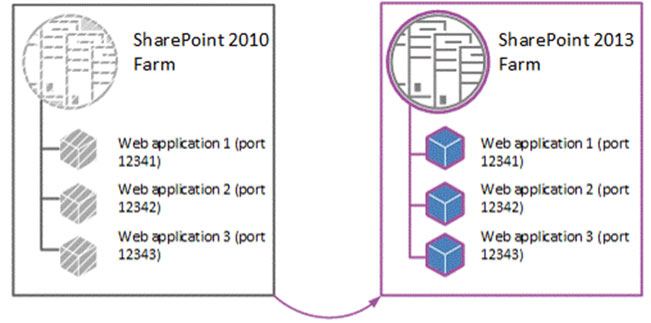
Image 5a: Go-Live and Monitoring Workflow
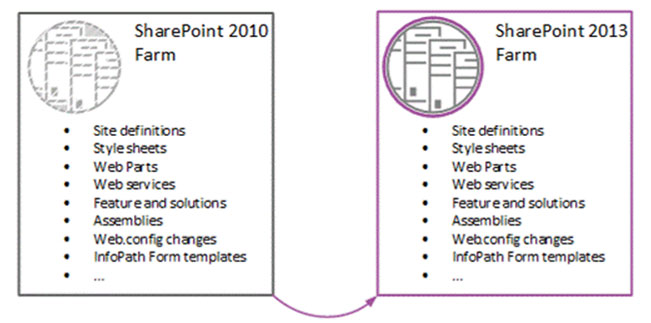
Image 5b: Go-Live and Monitoring Workflow
Solution
To address the challenges of content management and collaboration at Community College, Zirlen Technologies implemented a tailored solution with the following key components:
- Seamless Data Migration:
- Migrated content from Vignette CMS and SharePoint 2010 to SharePoint 2013 using the database-attach method.
- Employed Metalogix Migration Manager for efficient extraction, mapping, and integration of data while maintaining content integrity.
- Custom Configuration and Integration:
- Configured SharePoint 2013 farms to match the unique needs of the college, ensuring compatibility with legacy systems and user workflows.
- Installed server-side customizations and configured service applications to replicate existing functionalities and enhance performance.
- Advanced Collaboration Tools:
- Integrated Microsoft Office 365 applications, providing students and faculty with tools like Word, Excel, PowerPoint, and OneDrive.
- Enabled advanced collaboration features, including Yammer and OneNote, to foster an interconnected academic environment.
- Responsive Design:
- Optimized SharePoint 2013 for use across various devices and browsers, ensuring accessibility for students and staff on the go.
- Comprehensive User Training:
- Conducted hands-on workshops for stakeholders, ensuring smooth adoption of the new system.
- Created detailed documentation and tutorials to support ongoing learning and effective use of the platform.
- Real-Time Monitoring and Continuous Improvement:
- Deployed system monitoring tools to track performance and identify areas for optimization.
- Established feedback loops to enable iterative improvements and ensure long-term scalability.
Lessons Learned Example
Challenge in Metadata Mapping:
Early feedback revealed challenges in metadata mapping, which were addressed through iterative testing and targeted user workshops.
Minimizing Downtime:
Ensuring minimal downtime during migration required proactive communication and phased rollout strategies, effectively maintaining operational continuity.
Key Features Delivered
1: Advanced Collaboration Tools
- Integration with Microsoft Office 365 applications (Word, Excel, PowerPoint, Yammer).
- 1TB of encrypted cloud storage via OneDrive for Business.
2: Responsive Design
- Optimized for a wide range of devices and browsers, including IE 7+, Safari, Firefox, and Chrome.
3: Enhanced Search Capabilities
- Advanced search features for quick access to critical resources and content.
4: Improved User Experience
- Intuitive interfaces for faculty, students, and staff.
- Seamless access to collaboration tools from anywhere.
Image 6: Key Features Overview
Outcomes
- Operational Efficiency:
- Reduced staff hours spent on system maintenance and support.
- Streamlined workflows for content management and collaboration.
- The migration reduced database query times by 40%, significantly enhancing user response times and improving system efficiency for students and staff.
- Cost Savings:
- Lower infrastructure and storage costs by migrating to a cloud-based system.
- Minimized hardware upgrade and replacement expenses.
- Scalability and Availability:
- 9% uptime ensured through Microsoft’s SLA.
- Capacity for future expansion and integrations.
- User Satisfaction:
- Positive feedback from students and faculty on system performance and accessibility.
- Increased adoption of collaboration tools across departments.
Conclusion
The transition to SharePoint 2013 has reinforced College’s commitment to being a forward-thinking institution, adeptly leveraging technology to enhance both academic excellence and operational efficiency. By modernizing its content management systems, College has significantly improved accessibility, collaboration, and resource management for students, faculty, and staff. This initiative reflects the college’s dedication to fostering an environment where technology drives meaningful outcomes.
Zirlen Technologies delivered a tailored, scalable solution that minimized disruption during migration while equipping College with a robust platform capable of adapting to future needs. This modernization effort has positioned College as a leader among community colleges in adopting cutting-edge technology, setting a benchmark for innovation and collaboration in higher education. The successful implementation ensures College remains agile and responsive to evolving academic and operational demands.
The SharePoint 2013 system sets the foundation for future innovations, such as AI-driven analytics and real-time reporting, enabling College to remain at the forefront of higher education technology.