
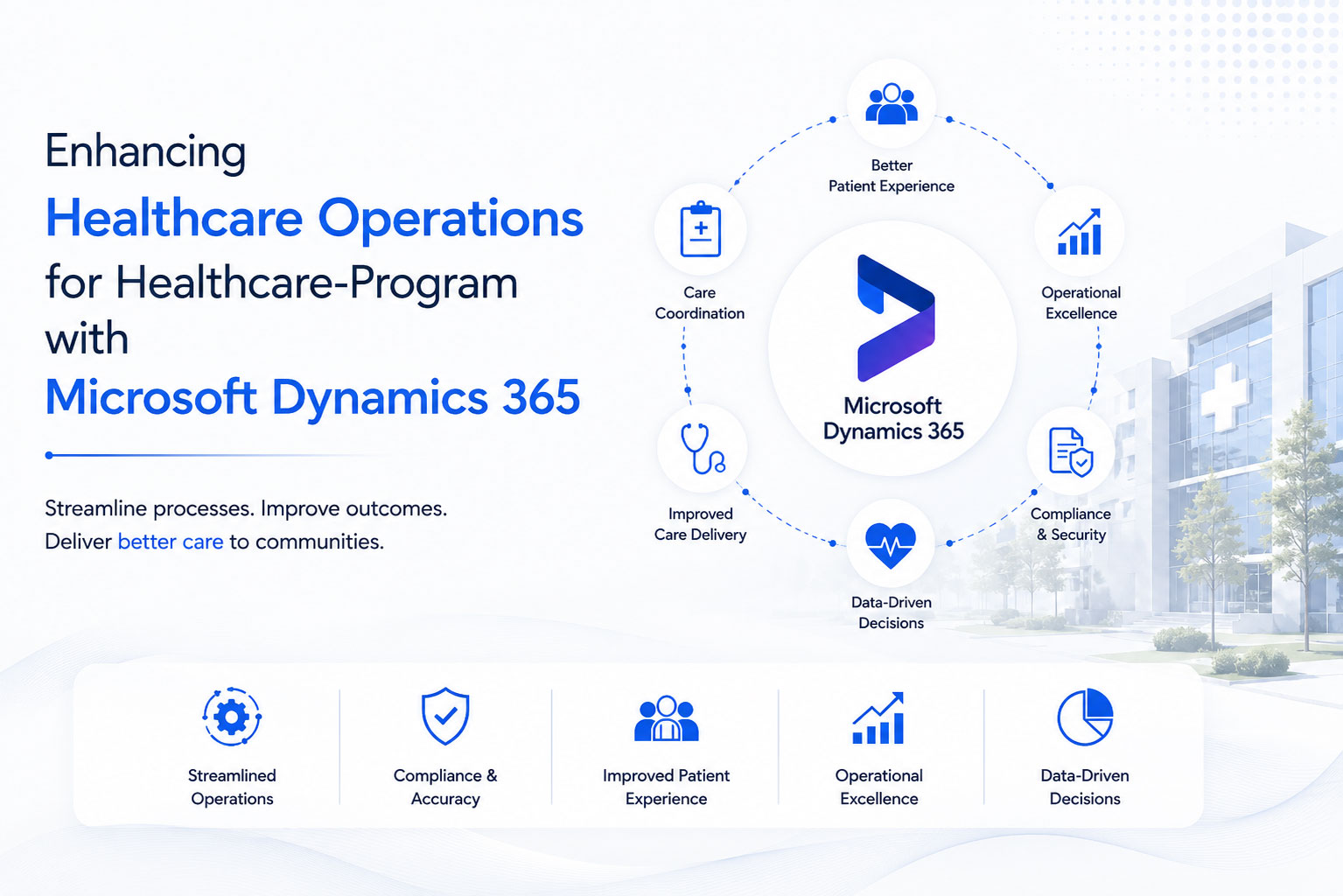
Enhancing Healthcare Operations for Healthcare Program with Microsoft Dynamics 365
Client Overview
A major Healthcare program administers Healthcare and other healthcare programs on behalf of a client’s healthcare commission. Managed by a leading IT consulting firm, the program serves as the cornerstone of healthcare management for millions of residents in the community. Their primary objective is to provide accurate, timely, and actionable information to healthcare providers.
Project Objective
Transition the healthcare program’s existing Microsoft Dynamics CRM On-Premises system to Microsoft Dynamics 365 Online to enhance operational efficiency, reduce infrastructure costs, and improve scalability while ensuring minimal disruption to mission-critical healthcare services.
Project Overview
The project was structured into the following six critical phases:
Phase 1: Initial Assessment and Strategic Planning
- Conducted a comprehensive review of the healthcare program’s existing Dynamics CRM environment.
- Identified system bottlenecks, challenges, and areas for optimization.
- Established a clear roadmap and defined objectives for the migration process.
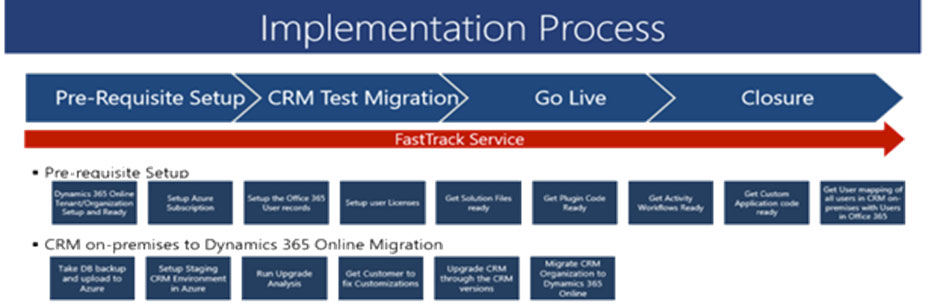
Transitioning from Microsoft Dynamics CRM 2016 (On-Premises) to Dynamics 365 Online, ensuring scalability and improved system availability
Phase 2: Team Formation and Tool Setup
- Assembled a multidisciplinary team, including project managers, developers, and testers.
- Set up necessary tools and environments, including staging and sandbox systems.
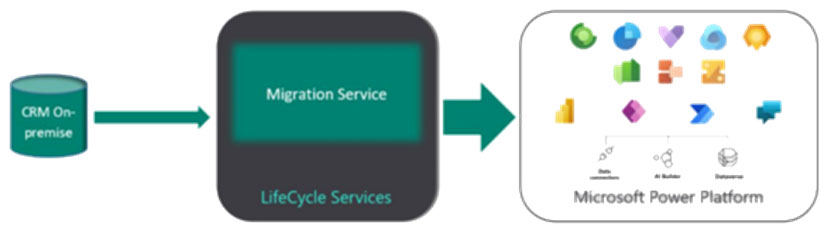
Migrated CRM solutions efficiently using tools like SCRIBE and ensured successful deployment to the cloud environment.
Phase 3: Development and Customization
- Tailored Dynamics 365 to the healthcare program’s specific needs, including custom workflows, plugins, and automation features.
- Integrated third-party tools and services to enhance functionality.
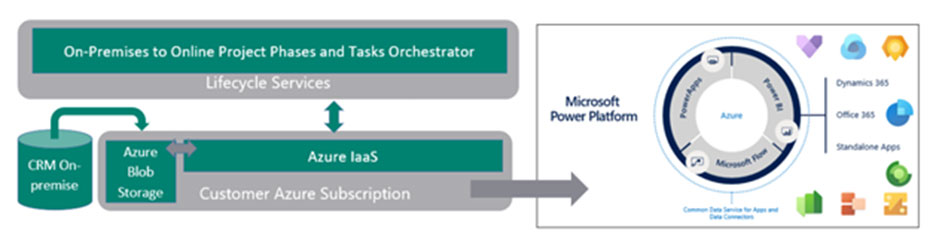
Integrated on-premises CRM with Azure for enhanced lifecycle management and unified Power Platform capabilities.
Phase 4: Validation Check
- Conducted extensive testing to validate system configurations.
- Addressed any identified issues through iterative development cycles.
Phase 5: Data Migration and Integration Testing
- Migrated all critical data from the on-premises system to the Dynamics 365 cloud platform.
- Performed rigorous integration testing to ensure seamless operation of interconnected systems.
Phase 6: Training, Go-Live, and Continuous Monitoring
- Trained end-users on the new system through workshops and detailed documentation.
- Executed a phased go-live plan to minimize operational disruption.
- Implemented monitoring tools to track system performance and ensure continuous improvements.
Technical Flow Diagram
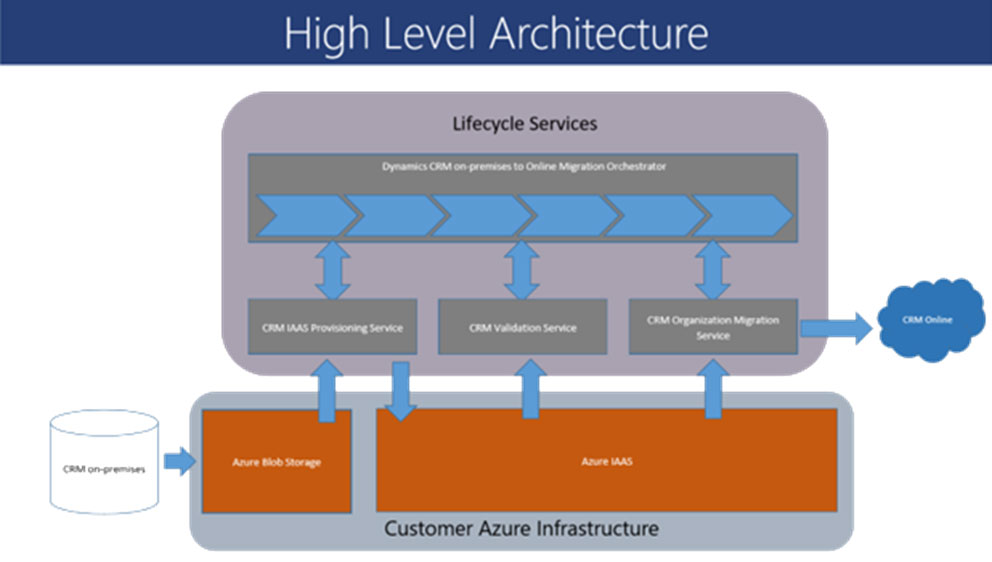
Streamlined project lifecycle from assessment to deployment, ensuring robust validation, continuous monitoring, and iterative improvements for successful Dynamics 365 migration
Microsoft Dynamics CRM Integration
Zirlen Technologies successfully integrated Microsoft Dynamics CRM into the healthcare program’s environment to streamline identity authentication and user access management. This implementation significantly improved system reliability and user experience.
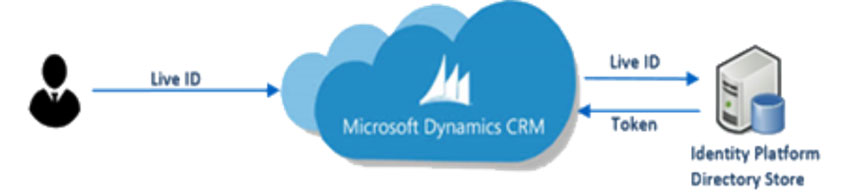
Microsoft Dynamics CRM leverages secure token-based authentication with Live ID to enable seamless user verification and access management.
Key Features Delivered:
- User Access Authentication:
- Integration of Microsoft Dynamics CRM with Live ID to manage user access securely.
- Tokens generated and validated through an Identity Platform Directory Store, enabling quick and reliable authentication for end-users.
- Efficient Identity Management:
- Strengthened user authentication processes.
- Simplified integration with the healthcare program’s legacy systems and third-party applications.
Office 365 Identity Management and Directory Sync
Zirlen also implemented Azure Active Directory Sync Services to unify the healthcare program’s on-premises and cloud-based identity platforms. This approach ensured consistent and secure identity management across hybrid environments.
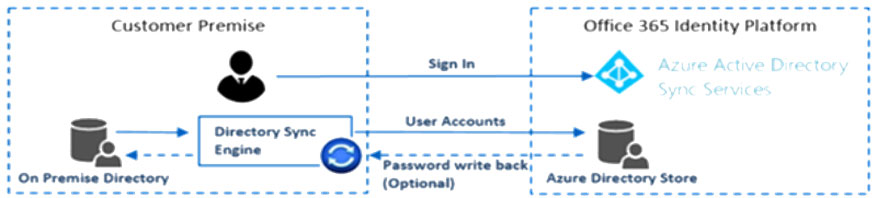
Office 365 Identity Platform integrates on-premises directories with Azure Active Directory Sync Services, enabling unified identity management and optional password write-back.
Key Capabilities:
- Directory Synchronization:
- On-premises directories were synchronized with **Azure Directory Store** using a Directory Sync Engine.
- Ensured seamless user account synchronization and consistent identity management.
- Sign-In and Password Write-Back:
- Enabled single sign-on (SSO) functionality for user authentication.
- Supported optional password write-back, allowing password consistency across platforms.
Outcomes:
- Enhanced security and compliance for user access.
- Improved operational efficiency by reducing manual identity management tasks.
Technical Features Delivered
- Enhanced System Capabilities:
- Migration to a SaaS-based Dynamics 365 Online environment.
- Improved scalability with a Microsoft SLA of 99.9% uptime.
- Integration with Power BI and Power Automate for real-time analytics and process automation.
- Advanced User Experience:
- Simplified email configuration and tracking.
- Centralized data access with advanced search capabilities.
- Seamless sharing and collaboration via OneDrive.
- Cost and Resource Optimization:
- Elimination of on-premises server maintenance costs.
- Reduction in storage requirements.
- Automatic software updates and patches managed by Microsoft.
- Improved Security and Compliance:
- Enterprise-grade security through Microsoft’s cloud infrastructure.
- Role-based access controls tailored to user responsibilities.
Business Outcomes
- Operational Efficiency:
- Reduced staff hours required for system maintenance.
- Improved data accuracy and accessibility for Healthcare program providers.
- Cost Savings:
- Lower subscription costs compared to on-premises infrastructure.
- Minimized hardware and storage expenses.
- Scalability and Flexibility:
- Ability to scale operations dynamically with cloud-based resources.
- Simplified integration with additional Microsoft applications.
Conclusion
The transition to Microsoft Dynamics 365 Online positioned the healthcare program for enhanced operational efficiency and cost-effectiveness. Zirlen Technologies successfully delivered a robust and scalable solution tailored to the healthcare program’s needs, ensuring minimal disruption during the upgrade process and equipping the organization to meet future challenges. By leveraging cloud-based infrastructure and advanced integration tools, the healthcare program is now able to deliver higher quality services with reduced overhead costs. This modernization has paved the way for future innovations, ensuring the client remains agile and responsive to evolving healthcare demands.